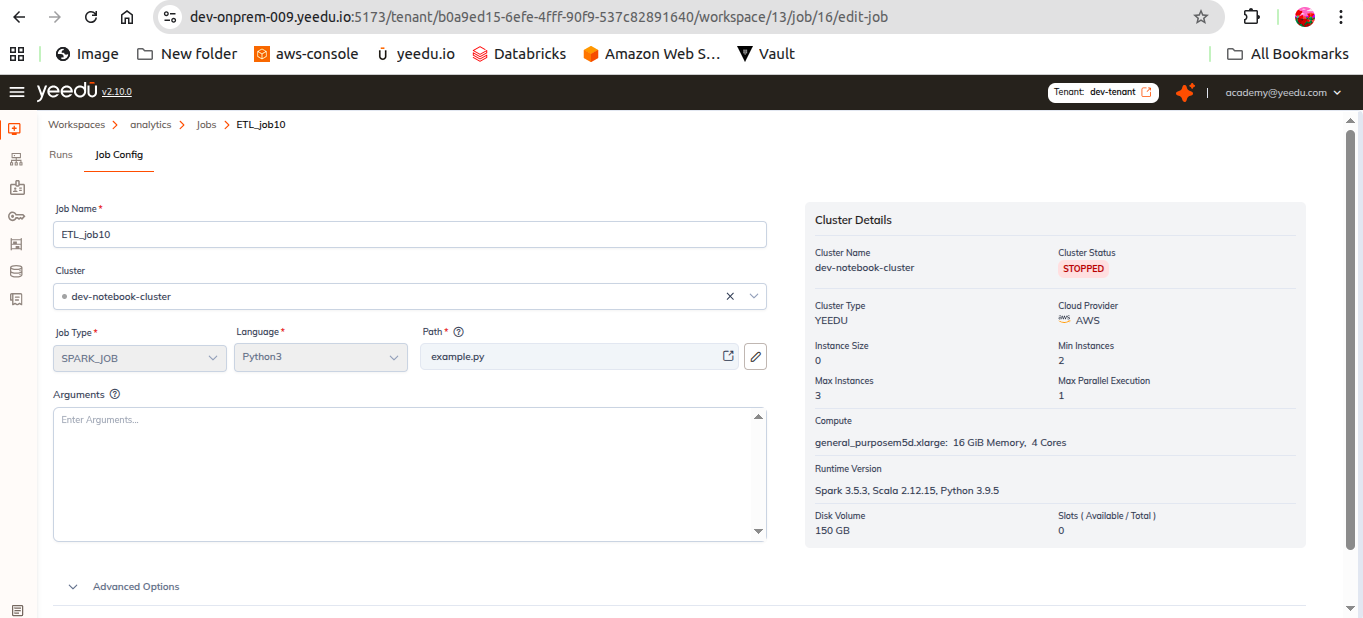
Modify Jobs
Opening a job from the Jobs Dashboard takes you to the job's own page, which is organised into two sections: execution history and configuration.
1. Runs
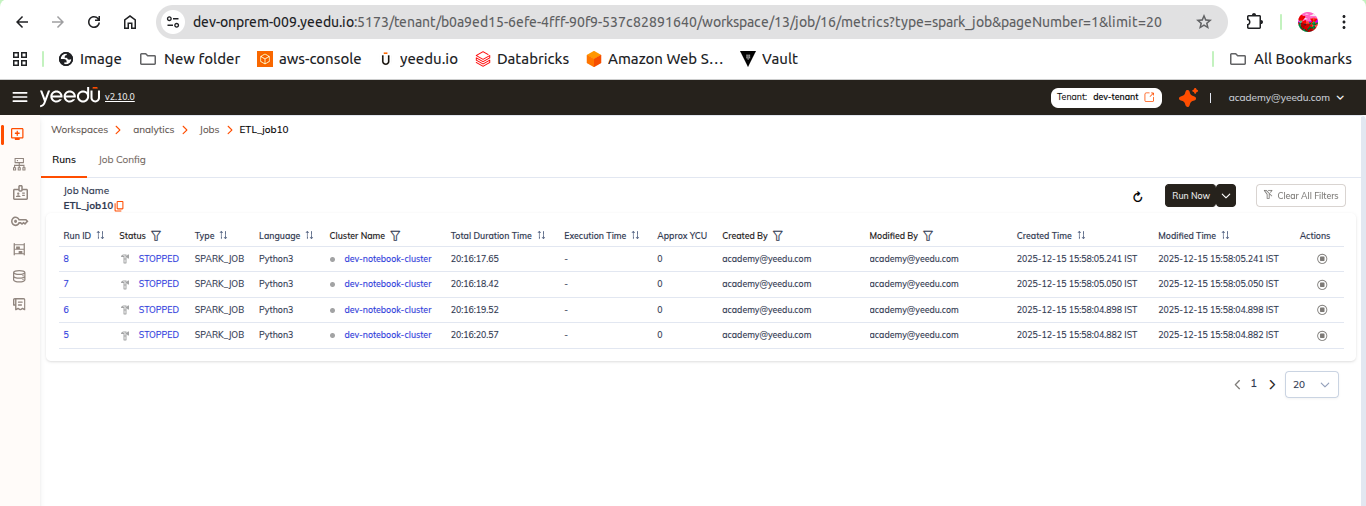
The execution history of this job. We show the same run records that appear on the workspace Runs tab, narrowed to this job.
Details shown
| Column | Detail |
|---|---|
Run ID | The run's unique numeric identifier. Links to the run detail page. |
Status | One of the seven run states below. |
Type | JAR, Functions, Custom Code, Notebook or Thrift SQL. |
Language | Raw Scala, Python, Python3, Scala, Thrift SQL, SQL or Spark SQL, or - where the type doesn't take one. |
Cluster Name | The cluster the run executed on. |
Total Duration Time | Wall-clock time from submission to completion. |
Execution Time | Time spent actually executing. |
Approx YCU | Approximate Yeedu Compute Units consumed. Carries an ⓘ info button. |
Created By | The user who submitted the run. |
Modified By | The user who last changed it. |
Start Time | When execution began. |
End Time | When execution finished. |
Created By, Modified By, Start Time and End Time are optional columns, use the
column-options icon ▦ in the toolbar to show or hide them.
Run statuses
There are seven, not three:
SUBMITTED · RUNNING · DONE · ERROR · TERMINATED · STOPPING · STOPPED
We render each status with its own distinctive icon and colour. A run in ERROR carries an orange
sparkle beside the status that expands to a Diagnose pill on hover, see
Error Diagnosis.
Actions
The Actions column holds a single Stop button (⏹). It's rendered disabled on runs that
can't be stopped, meaning anything already sitting in a terminal state such as DONE, STOPPED
or ERROR.
To start a new run, use the play button or Run with Arguments on the job's row in the
Jobs Dashboard.
2. Job Config
The job's configuration, presented in the same form used to create it. We explain what each individual field means in Create Job.
Common fields
Job Name · Cluster · Job Type
The fields underneath Job Type depend on the selection:
| Job Type | Fields |
|---|---|
JAR | Path · Class Name · Arguments |
Custom Code | Language (Raw Scala, Python or Spark SQL) · Path · Arguments |
Functions | Language · Project Path · Script Path · Function Name · Function Requirements · Function URL · Auth Token · Example Request Body, plus Function Concurrency and Function Timeout |
Advanced options
An Append checkbox, then:
- Tabs:
Configs(with a Bulk Edit toggle and Key/Value rows) ·Packages·Jars·Repositories·Archives·Files - Principal & Key Tab :
Principal,Key Tab - Driver Config :
Driver Java Options,Driver Library Path,Driver Class Path - Concurrent Runs :
Maximum Concurrent Job Runs, default0. Set it higher than0to run the same job concurrently. - Timeout :
Job Timeout (minutes), default0. The maximum time a job may run before it is automatically terminated.
We don't allow the Job Type to change after creation.